Chrome Extension · Free
Turn every scan at your booth into a lead you can follow up on Monday
KatchT Event Link & QR Builder is the fastest way for event and field marketers to create trackable campaign links — and the matching QR codes — for trade show booths, badges, signage, webinars, and post-event follow-up.
Pending Chrome Web Store review — check back soon.
How it works
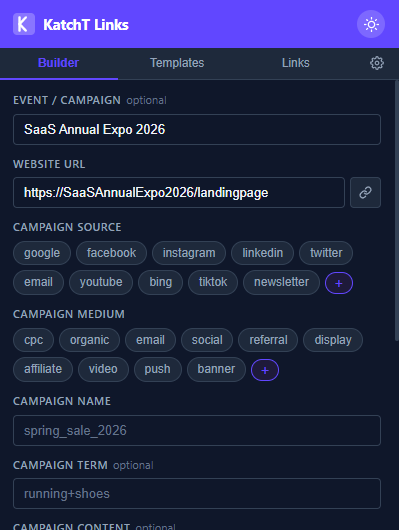
Name the event, grab the URL, tag it with a click
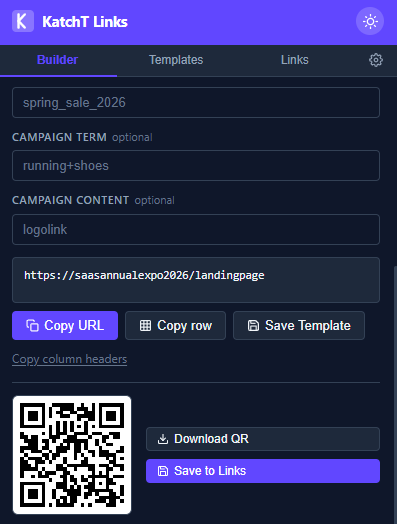
A live QR renders as you type — download or save it
Name your event
Type the event or campaign once — autocomplete pulls it up next time, so every link this quarter lands under the same name instead of scattered across a spreadsheet.
Build the tagged link
Source, medium, and campaign fill in from quick-pick chips (with optional GA4 fields for campaign ID, source platform, and creative format). Grab the current tab's URL with one click, or paste your own.
Get a QR that's yours to keep
A live QR renders as you type. Download a print-ready PNG for the booth banner or badge, and save the link — it groups with every other link from the same event, ready for KatchT HQ.
QR codes that never expire
Your QR code encodes your full UTM link directly, generated on your device, so there is no server in between that could switch it off. No subscription and no expiry, unlike the codes freemium QR generators quietly time out. Print it on a banner today and it still works at next year’s show, with your UTM tags landing in Google Analytics. Want scans counted separately from clicks, or the option to change where a printed code points? Send the link to KatchT HQ and turn on tracking for it.
Your data stays yours
- No account required to use the extension
- No analytics, no tracking, no ads
- Settings and templates sync through your own Google account — saved links stay on your device
- Export everything as JSON, any time
Part of the KatchT Suite
Saved links use a portable, KatchT HQ-ready format. Paste a connection token from KatchT HQ into the extension’s Settings tab and send your saved links straight in — no re-entering data, no separate export step. When you’re ready to manage every event in one place, your links come with you.
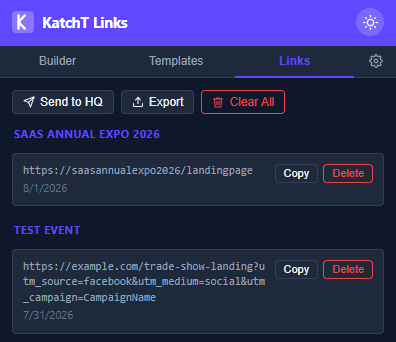
Saved links group by event — ready to send to KatchT HQ
Running an event and need the ROI math too? Try the free calculator →