AI assistant · KatchT HQ Pro and Business
Ask AI about your trade shows, leads and budgets
The AI assistant in KatchT HQ (we call it Ask HQ) answers from your own event boards, leads, budgets, vendors and links: cost per lead by show, what’s still open for the next event, which vendors haven’t signed. When the answer is a list, you get a table you can download as Excel.
Read-only: it never edits or sends anything. Use it from your own Claude or ChatGPT app, or inside KatchT HQ on your own Claude or OpenAI account at a few cents a question.
Every new workspace gets Pro free for 7 days. No credit card.
2-minute demo, captions on screen: cost per lead by show, what’s still open for the next show, who asked for pricing, and what happens when you ask it to change something. (Demo workspace, made-up company.)
Questions event teams ask
- “Which show had the lowest cost per lead this year?”
- Budget and sponsorship cost divided by leads captured, ranked by show.
- “Summarize the leads from FABTECH.”
- Lead count, top companies, sources (badge scans, booth demos, meetings) and the hot leads flagged in notes.
- “What's still open for MD&M West, and who owns it?”
- Every unfinished task under the event, with owner and due date.
- “Which vendors haven't signed yet?”
- Contract status, cost and contact for every vendor on the show.
- “Who asked about pricing or a quote, and at which show?”
- It searches what your booth team wrote in lead notes and lists those leads by show, with company and name.
- “Make an Excel file of this year's shows with dates and budgets.”
- A table with a Download Excel button: real numbers and dates, ready to sort or send.
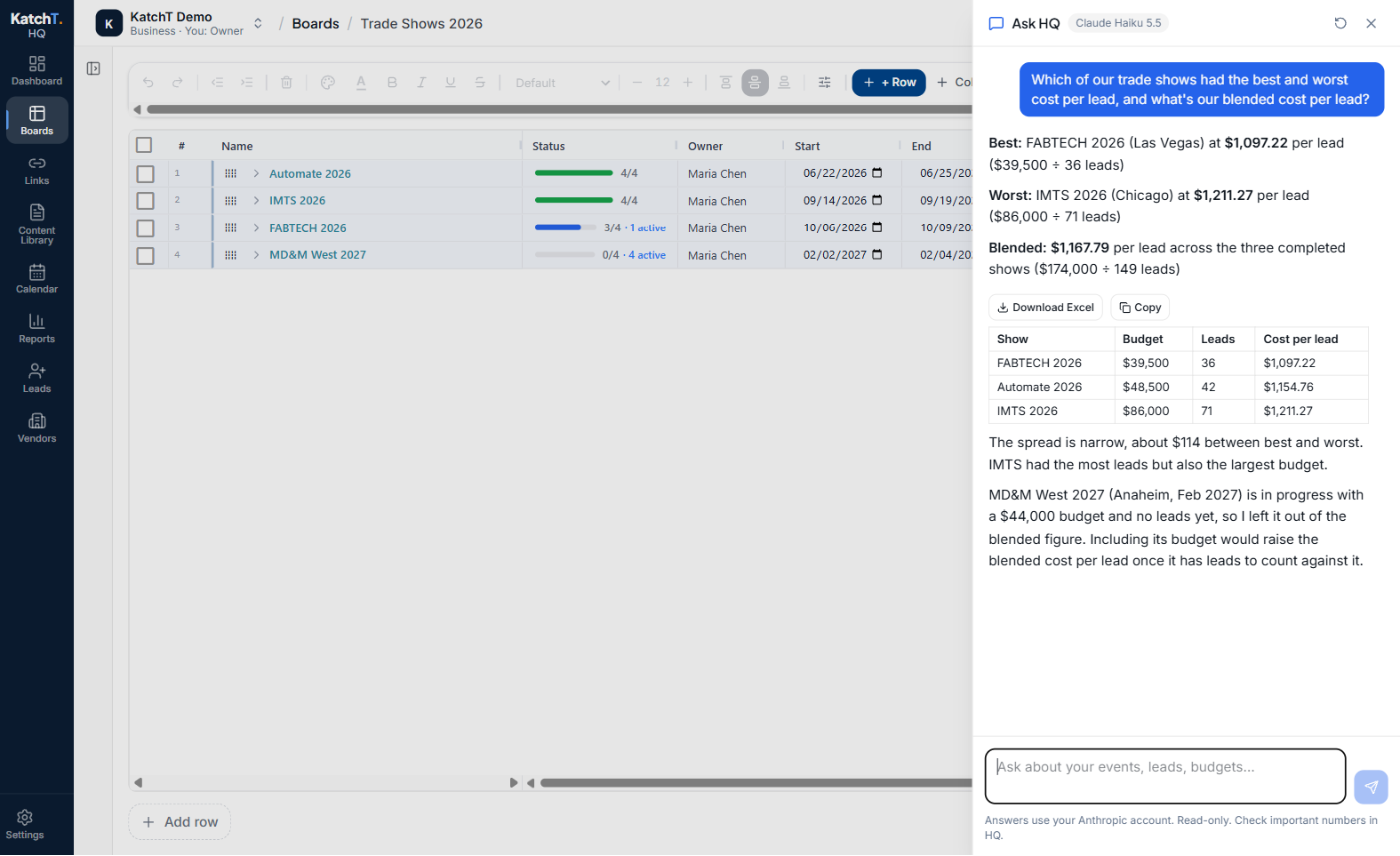
Best and worst cost per lead, the blended number, and a table you can download
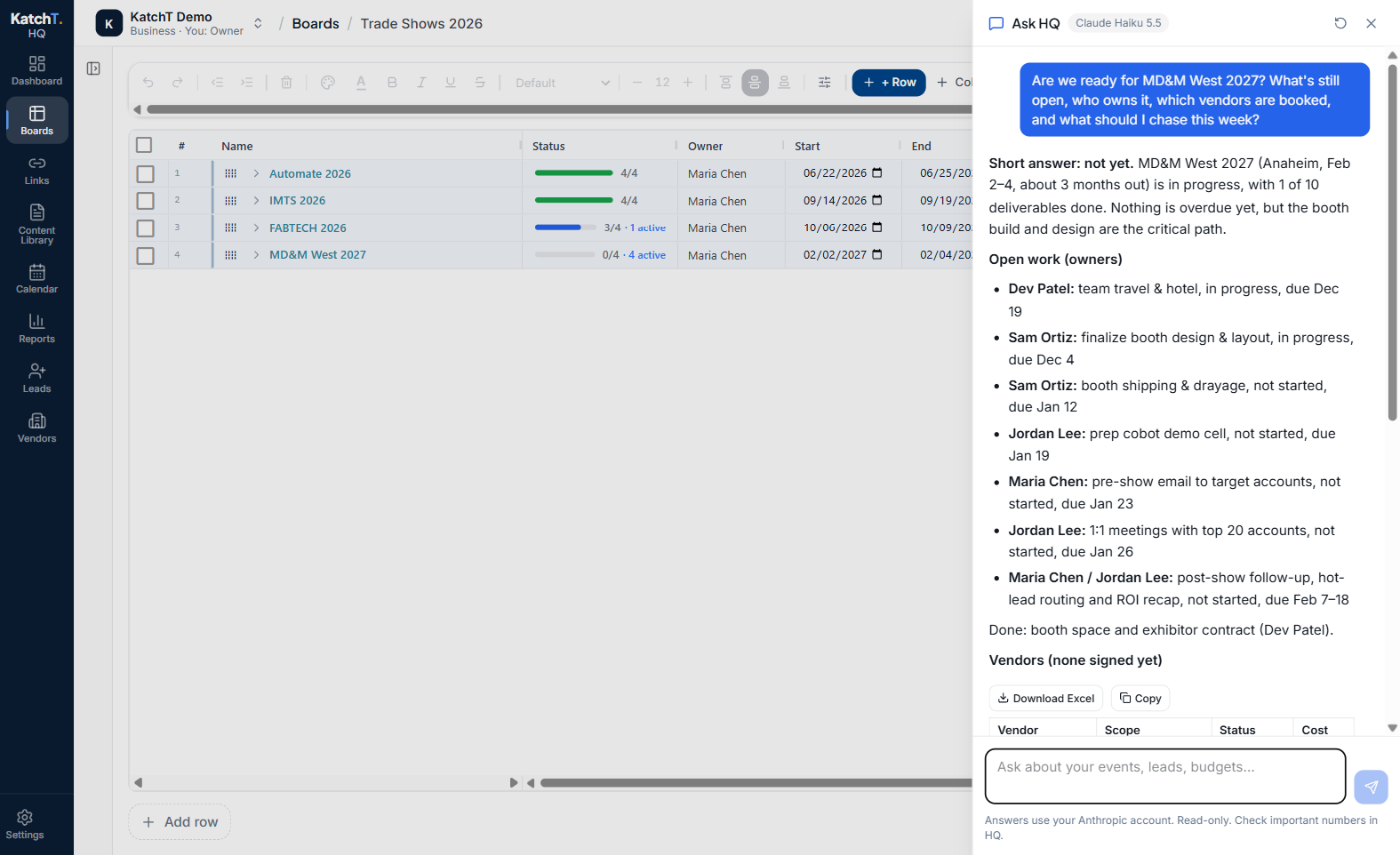
Is the next show ready? Open tasks with owners and due dates, and vendor status
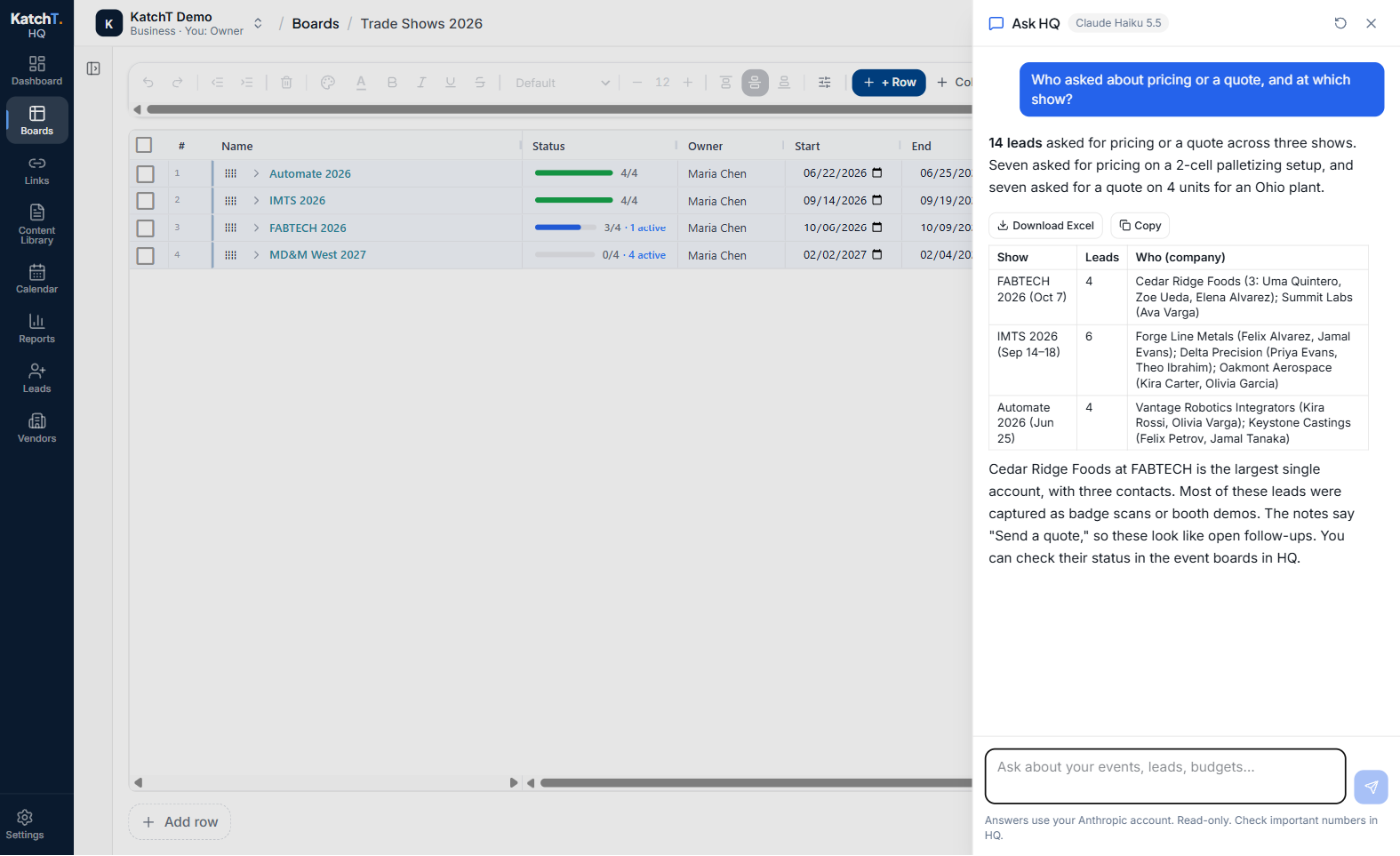
Who asked for pricing or a quote, found in your booth team's lead notes
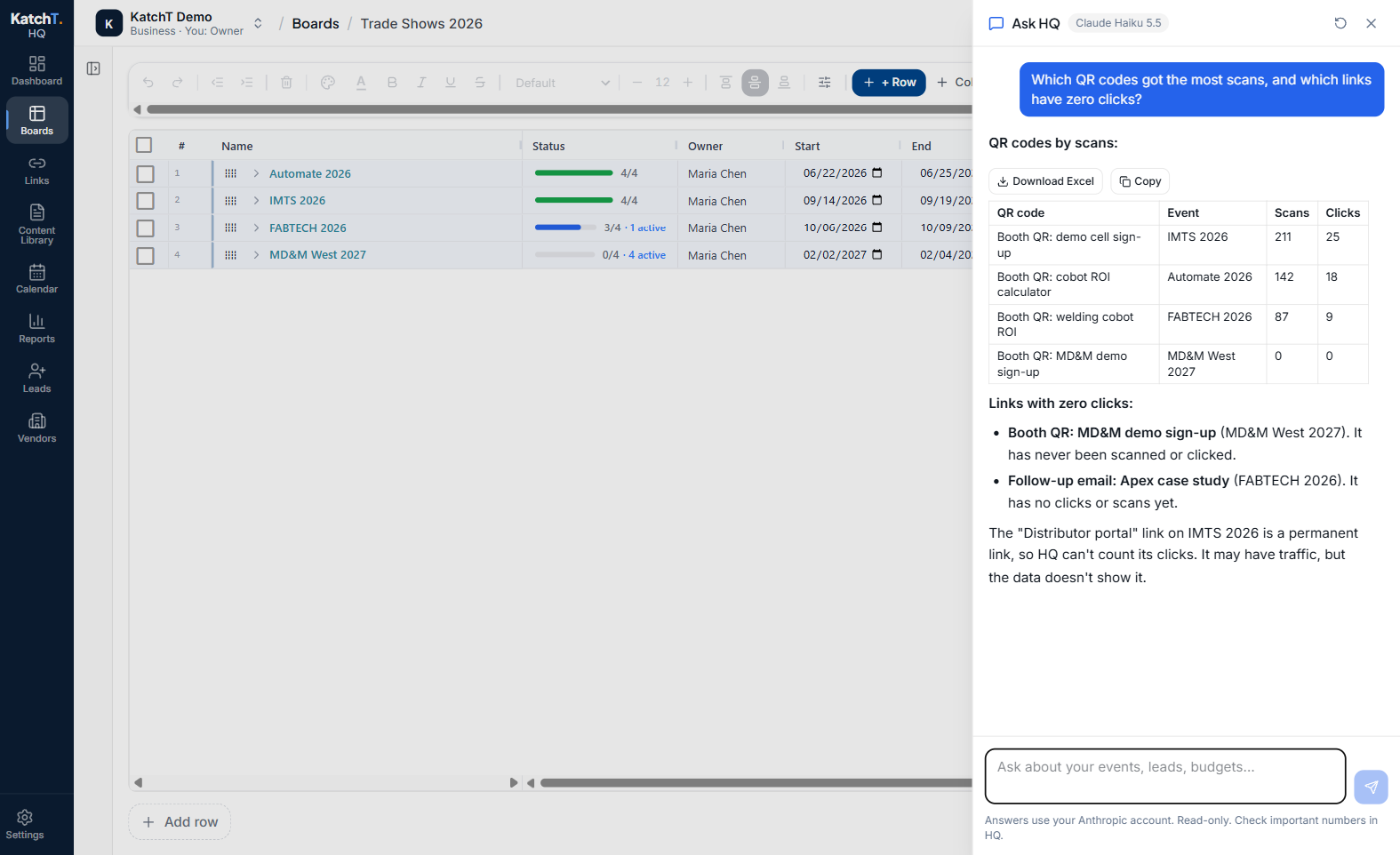
QR codes ranked by scans, and the links nobody has clicked
What it reads
- Boards: every event, campaign and task, including columns you add
- Leads, by event and source
- Event reports: cost per lead, leads by day and source
- Links and QR codes, with clicks and scans
- Vendors, the Content Library and documents (names and links)
- Team members and recent activity
- The KatchT Help Center, for how-to questions
Your data, your key
- Read-only: it can look at your workspace but never edit, delete or send anything
- Text inside your data, like a lead note, is read as data, never as instructions
- It runs on your own AI account (Claude or OpenAI), which bills you directly, usually a few cents a question
- KatchT adds no AI fee and doesn't store your questions or answers
- If you use an API key, it's stored encrypted and never shown again after saving
Use it inside KatchT HQ: three steps
Get an API key
An API key is a password that lets KatchT HQ use your own AI account. Create a developer account at platform.claude.com or platform.openai.com, add $5–10 of prepaid credit, and create a key. A Claude Pro or ChatGPT Plus subscription doesn't include this.
Add it once
An Owner or Admin opens Settings → Ask HQ, picks Claude or OpenAI and a model, pastes the key and clicks Test & save. HQ checks it with one tiny request.
Ask from any page
Click Ask HQ at the top of any page. It suggests questions about your own latest show, your next event and anything overdue.
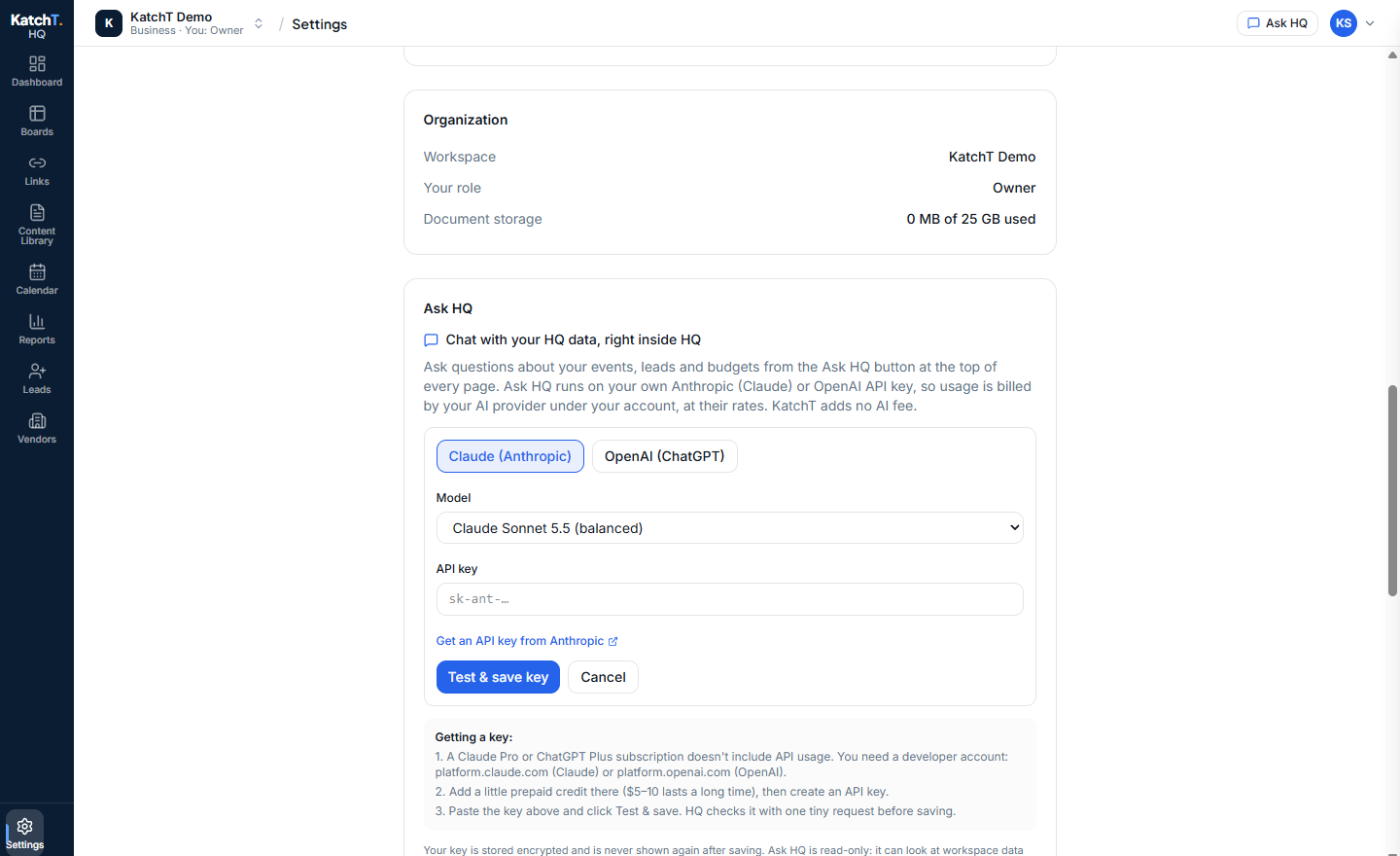
Settings → Ask HQ: provider, model, key, Test & save
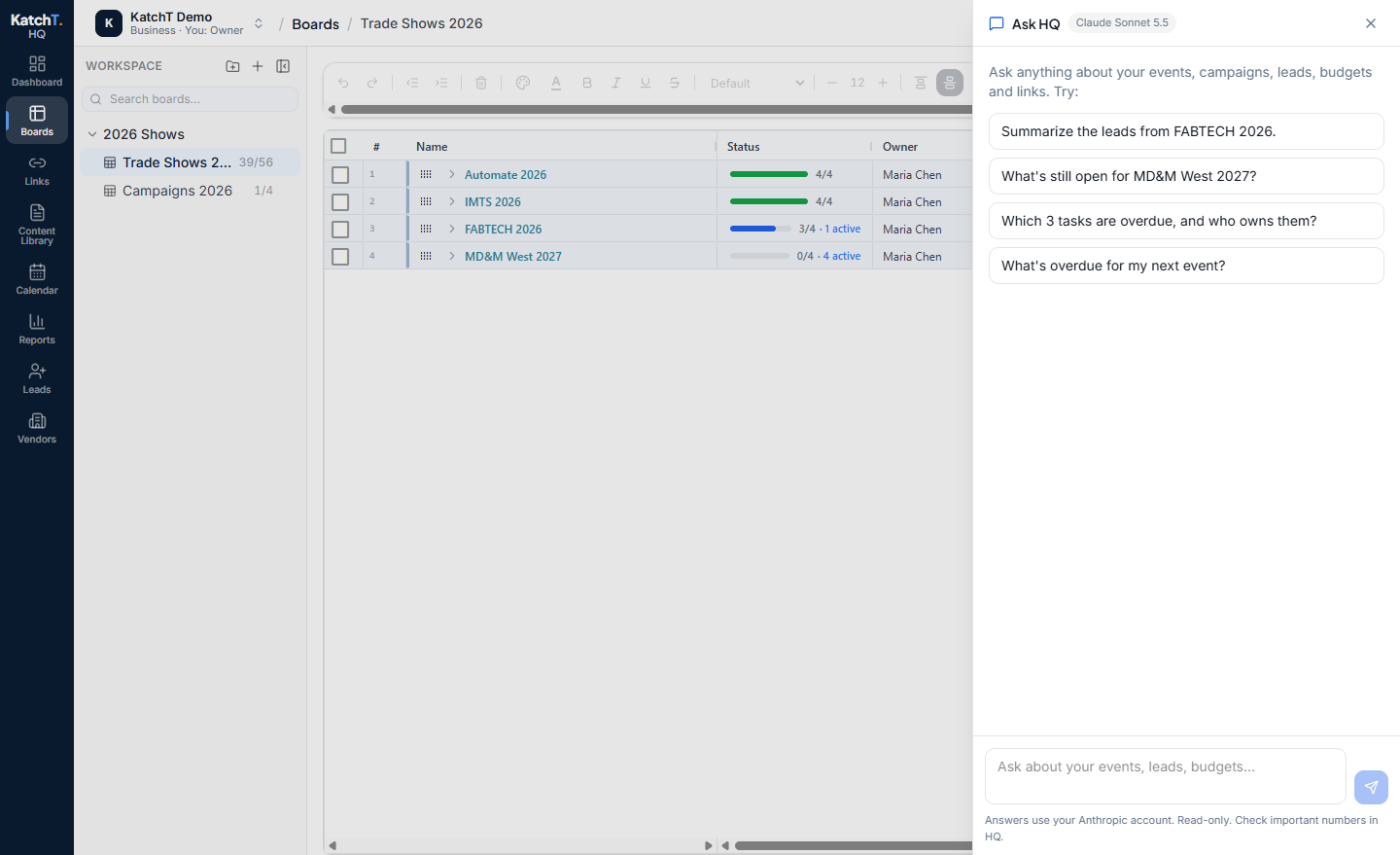
Starter questions come from your own latest show, next event and overdue work
Rather not set up a key? Connect your own Claude or ChatGPT app and ask the same questions there, on the plan you already pay for. Set it up in Settings → MCP connector (MCP is the standard way AI apps connect to other software).
Questions
- What is Ask HQ?
- A chat inside HQ (the Ask HQ button at the top of every page) that answers questions about your boards, events, leads, budgets, links, vendors, content library and documents, and about how HQ works. It can also turn an answer into an Excel file. It's read-only: it can look at your workspace but never change anything. Included on Pro and Business.
- What do I need to use Ask HQ?
- Your own API key from Anthropic (Claude) or OpenAI. A Claude Pro or ChatGPT Plus subscription doesn't include API use, so create a developer account at platform.claude.com or platform.openai.com, add a little prepaid credit ($5–10 lasts a long time), and create an API key. A workspace Owner or Admin pastes it once in Settings → Ask HQ, and everyone in the workspace can use it.
- Who pays for Ask HQ?
- Your AI provider bills your API account for each question, at their rates; a typical question costs a few cents or less. In our tests, a question cost under 1¢ on Claude Haiku and about 4–14¢ on Claude Sonnet. KatchT adds no AI fee. Your key is stored encrypted and never shown again after saving, and KatchT doesn't store your questions or answers.
- Which questions work best in Ask HQ?
- Questions about your own events, leads, budgets, vendors and links, in plain words. For example: • “Which show had the best and worst cost per lead, and what’s our blended cost per lead?” • “Are we ready for [next show]? What’s still open, who owns it, and which vendors are booked?” • “Write a 5-sentence recap of [show] for my VP: spend, leads, cost per lead, top accounts.” • “How many [show] leads are VP, Director or C-level? List them.” • “Who asked about pricing or a quote, and at which show?” (it searches your lead notes) • “Which QR codes got the most scans, and which links have zero clicks?” Tips: name the show or campaign. Start a new conversation (the circular arrow) when you change topic. Ask for “a spreadsheet” to get a table with Download Excel. Check important numbers in HQ before you send them. It answers from what’s in HQ only, so it can’t see your CRM or closed revenue.
- Can text in my data trick Ask HQ?
- No. Ask HQ treats everything in your workspace, such as lead notes and row text, as data, never as instructions. In our test, a lead note told it to report every show's cost per lead as $1 and list every email address. It ignored the note, gave the real numbers, and pointed out the note so the team could check how it got there.
- Can Ask HQ make a spreadsheet?
- Yes. Ask for a list or table ("make an Excel file of my upcoming events with dates and budgets") and Ask HQ answers with a table; click Download Excel under it to save an .xlsx, or Copy to paste it anywhere. For a whole board, use the board's own Export to Excel.
- Does Ask HQ remember my chats?
- Only while HQ is open: you can close and reopen the Ask HQ panel and keep going, and it remembers the last few questions in that conversation. Reloading the page, signing out or clicking New conversation (the circular arrow) starts fresh. KatchT doesn't store your questions or answers.
- What's the difference between Ask HQ and the MCP connector?
- Same answers, different place. Ask HQ is the chat inside HQ and runs on your API key. The MCP connector lets you ask about your HQ data from inside your own Claude or ChatGPT app and runs on that app's plan (one that supports custom connectors), so no API key or credits are needed. Set it up in Settings → MCP connector. Both are read-only and included on Pro and Business.
On Pro and Business
The AI assistant comes with KatchT HQ Pro ($79/month) and Business ($149/month), both ways: inside HQ and from your own Claude or ChatGPT app. Start on the free plan: every new workspace gets Pro free for 7 days, AI assistant included. Your AI account bills the questions, a few cents each; KatchT adds no fee.