Free Guide
QR codes for trade shows: print sizes, placements and tracking
Three things go wrong with booth QR codes. The code is too small for the distance. It opens the homepage with no tag, so the show gets no credit. Or it came from a free generator and stops working after the show. This guide fixes all three before the banner goes to print.
No signup. The code is made in your browser and never expires.
Where the code goes, and how big
A phone can read a code that is about a tenth as wide as the distance to it. That is a rule of thumb, not a spec, but it holds up under show lighting with an average phone. Size the code for the farthest place someone will stand when they scan it, then add a margin.
| Placement | Scanned from | Minimum width | Note |
|---|---|---|---|
| Back wall or hanging banner | 10 ft (3 m) | 12 in (30 cm) | Eye height, not above the header. People scan from the aisle. |
| Pull-up banner at the aisle edge | 5 to 6 ft (1.5 to 2 m) | 6 to 8 in (15 to 20 cm) | Put it in the lower third, where a phone is already pointing. |
| Counter card or table tent | 20 in (50 cm) | 2 in (5 cm) | One per counter, angled up, next to the thing it explains. |
| Staff badge or lanyard card | 12 to 20 in (30 to 50 cm) | 1.5 to 2 in (4 to 5 cm) | Front of the badge, below the name. It gets scanned mid-conversation. |
| Handout or one-pager | 10 to 12 in (25 to 30 cm) | 1 in (2.5 cm) | Bottom corner, with a one-line reason to scan. |
| Last slide of a talk | 15 to 30 ft (5 to 10 m) | A fifth of the slide height or more | Leave it up through the Q&A. Say what it opens. |
Three details decide whether a code at that size scans. Clear space: the QR standard asks for a blank margin of four modules (four of the small squares) on every side; a border, a logo or text inside that margin breaks the read. Error correction: every code carries spare data so it still reads when part of it is covered or smudged. Level M (about 15% recoverable) suits clean print; use level H (about 30%) only if you are putting a logo in the middle. Link length: a longer link needs more modules, and more modules at the same print size means smaller squares. A full UTM link of about 120 characters needs roughly a 45 by 45 module code, so keep the destination short and let the tags do the work.
Make every scan count
A QR code that opens a plain link shows up in Google Analytics as direct traffic, the same bucket as someone typing your address. The booth did the work and gets no credit. Put UTM parameters in the link the code encodes, and each scan arrives with the show’s name on it.
Use one campaign name for the whole show, national-conference-2027, and change only utm_content for each placement. After the show, one filter in GA4 shows every scan the booth drove, and the content column shows which sign earned its space.
| Placement | Source | Medium | Content |
|---|---|---|---|
| Back wall banner | booth | qr | back-wall |
| Counter card | booth | qr | counter |
| Staff badge | badge | qr | staff-badge |
| Handout | handout | qr | one-pager |
| Last slide of the talk | speaking-slot | qr | slide-final |
GA4’s default channel rules have no rule for a medium called qr, so scans land in the Unassigned channel. That is fine when you report by campaign. If you want a QR channel in the channel report, add a custom channel group. The UTM naming convention keeps the values consistent across everyone who makes codes.
Permanent codes and tracked codes
There are two kinds of QR code, and the difference matters more at a trade show than anywhere else, because the code is printed on something expensive.
Permanent
The code encodes your full link directly. Nothing sits between the scan and your page, so nothing can switch it off. Print it on a banner today and it works at next year’s show. Your UTM tags still reach GA4. The trade-off: you cannot change where it points after printing, and you count scans only through analytics on the landing page.
Tracked
The code encodes a short link that redirects to your page. The redirect counts each scan and lets you change the destination after the banner is printed. The trade-off: the code works only while the redirect service does. If the service pauses the link, the printed code is dead.
Most free online generators make tracked codes without saying so, and the redirect ends with the free trial. For anything printed, start with a permanent code. Choose a tracked one when you need the scan count separate from clicks, or when the destination might change between ordering the banner and the show.
The free KatchT Event Link & QR Builder extension makes permanent codes on your device, with the UTM tags built in and a print-ready PNG. When you want a tracked code, send the link to KatchT HQ and turn on tracking: HQ counts clicks and scans, lets you edit the destination after printing, and keeps codes you already printed working if you ever downgrade. Tracking is included on every plan, with ten tracked links at a time on the free Starter plan and unlimited on Pro and Business (plans).
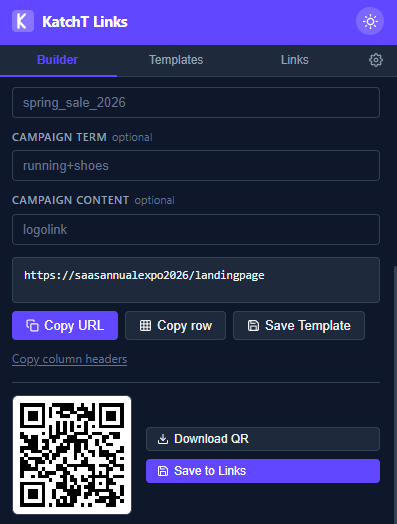
The extension renders the code as you type and downloads a print-ready PNG
The page the code opens
A scan happens on a phone, standing up, in a loud hall, on the venue’s cellular signal. The page has to work in that moment or the scan is wasted.
- One action. Book a demo, download the one-pager, enter the draw. Not the homepage, not a menu.
- Name the show on the page. “Welcome from booth 412” tells the visitor the scan worked and tells you later which page converted.
- Light and fast. No video above the fold, no popup, no login wall. If it takes more than a few seconds over cellular, they put the phone away.
- Phone-sized form. Name, email, one question at most. Everything else can wait for the follow-up email.
Before you print
- 1
Scan the print proof, not the screen. Ink spread and paper color change the contrast.
- 2
Scan with an iPhone camera and an Android camera, from the distance in the table above.
- 3
Dark code on a light background. Light-on-dark codes fail on some phones.
- 4
Clear space around the code: at least four modules on every side, nothing printed inside it.
- 5
Matte finish for anything under show lighting. Gloss laminate throws glare into the camera.
- 6
Open the link on a phone over cellular, not the office Wi-Fi. That is how the booth visitor sees it.
- 7
Check the UTM values in the link: lowercase, hyphens, the right campaign name for this show.
- 8
Write the link and the placement in your link log, so next year you can find what the banner pointed to.
Make the codes for your next show
The free UTM builder makes a tagged link and a permanent QR code in your browser, no signup. The Chrome extension does the same from your toolbar, saves a template per show, and groups every code by event.
Questions
- How big should a QR code be on a trade show banner?
- Use the 10 to 1 rule of thumb: the code should be about a tenth of the distance it will be scanned from. A banner scanned from 10 feet needs a code about 12 inches wide. For anything hand-held, 1 inch (2.5 cm) is the practical floor for phone cameras.
- Do QR codes expire?
- A code that encodes your web address directly never expires; it is just a picture of the link. Codes from most free online generators point to the generator's own short link first, and that redirect stops when the free trial ends or the account lapses. Ask which kind you are printing before the banner goes to the printer.
- Can I track QR code scans in Google Analytics?
- Yes, by putting UTM parameters in the link the code encodes. GA4 then records each scan as a visit with that source, medium and campaign. GA4's default channel report lists a medium like qr as Unassigned, so filter by the show's campaign name or set up a custom channel group for QR traffic.
- Should I put a logo in the middle of the QR code?
- You can, if the code uses error correction level H (about 30% of the code can be covered or damaged and still scan) and the logo covers well under that. Test the print proof. A plain code at level M with a logo printed beside it scans more reliably and costs nothing.
- Where is the best place for a QR code at a booth?
- Where people already stop: the counter, the demo screen, the staff badge during a conversation. The back wall works when the code is at eye height and large enough for the aisle. Codes near the floor, above the header or on a moving screen rarely get scanned.
- Do I need a different QR code for each placement?
- Yes, if you want to know which placement worked. Keep the same campaign name and change utm_content (back-wall, counter, badge). The extension makes this a few seconds per code, and the report after the show tells you which sign earned its space.