Last updated
Ask Your Trade Show Data Questions in Plain English
By KatchT Team
Every event marketer has a version of the same Monday: the VP asks which show was worth it, and you spend the morning pulling a budget export, a lead export and last month's recap into one spreadsheet to answer a two-line question.
The data was never the problem. It was spread across boards, lead lists and invoices, and getting an answer meant rebuilding the picture by hand.
Questions you can ask
KatchT HQ has an AI assistant, Ask HQ, a chat that reads your workspace and answers in plain English. A few questions event teams ask in the first week:
- "Which show had the lowest cost per lead this year?" It takes each event's costs from your board, divides them by the leads captured there, and ranks the shows.
- "Summarize the leads from FABTECH." Lead count, top companies, where the leads came from (badge scans, booth demos, meetings) and anything flagged in the notes.
- "What's still open for MD&M West, and who owns it?" Every unfinished task under that event, with its owner and due date.
- "Which vendors haven't signed yet?" Contract status and cost for every vendor attached to an event.
- "What changed on the IMTS board this week?" Who changed what, from what to what.
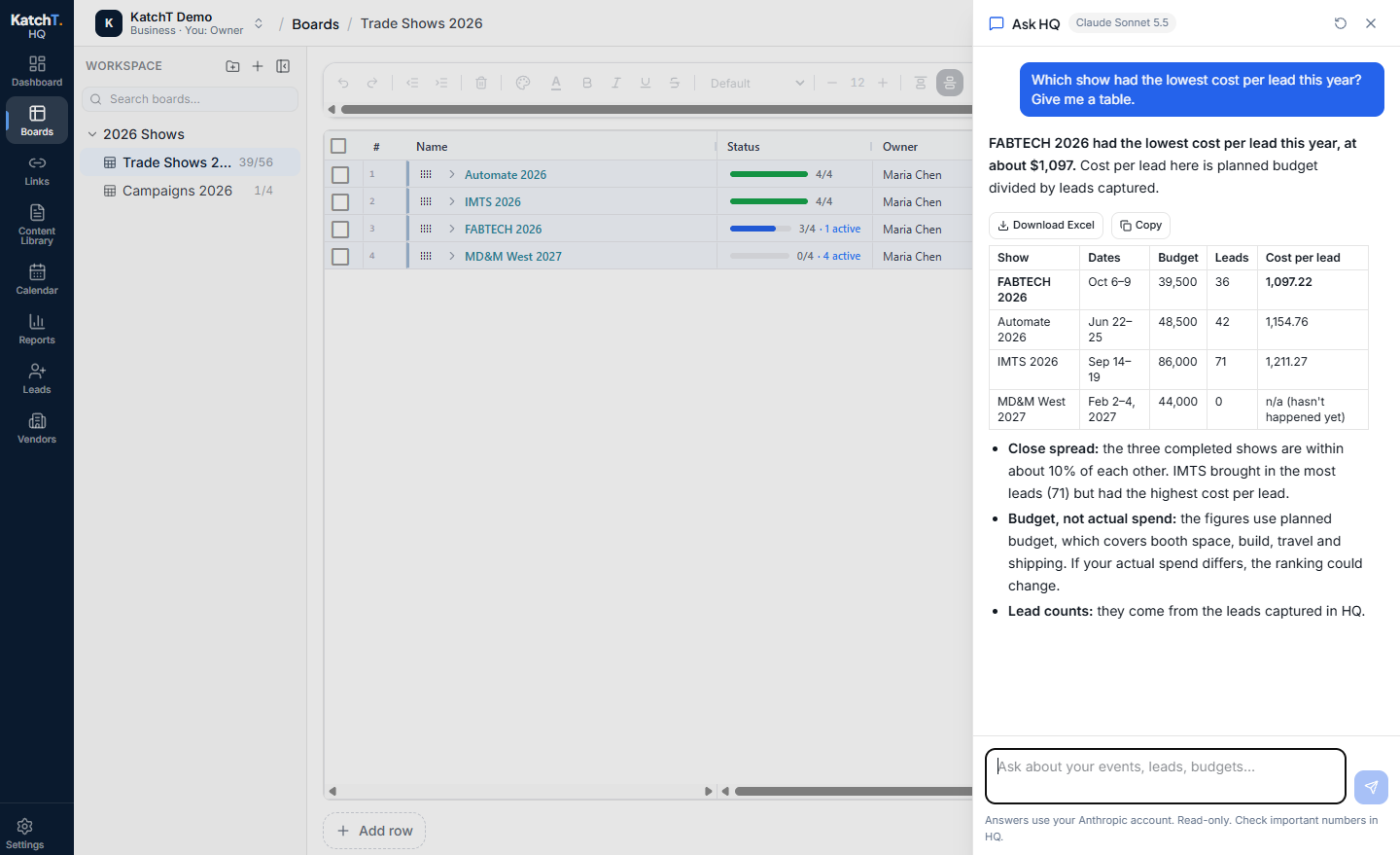
The answer comes as a table you can keep
When the answer is a list, the assistant writes it as a table with a Download Excel button underneath. Ask for "an Excel file of this year's shows with dates, budgets and leads" and you get an .xlsx with real numbers and dates, ready to sort or send.
It reads, it doesn't change anything
The assistant is read-only. It can look at your boards, leads, links, vendors, content library and documents, but it can't edit, delete or send anything. When you want to change something, it tells you where in HQ to do it.
Your own Claude or ChatGPT, no AI markup
There are two ways to connect, and neither adds a KatchT fee:
- From your own Claude or ChatGPT app: connect it to HQ (Settings → MCP connector) and ask the same questions there, on the plan you already pay for. No API key.
- Inside HQ: add your own Claude or OpenAI API key (a password that lets HQ use your AI account). Your provider bills usage at their rates, usually a few cents a question.
KatchT doesn't store your questions or answers.
The AI assistant is on Pro and Business. Start free: try it in KatchT HQ. Every new workspace gets 7 days of Pro, AI assistant included.