Last updated
What to Put in Your Post-Show Recap So Leadership Actually Reads It
By KatchT Team
Every trade show gets a recap, and most get the same treatment: someone skims the first page for the total cost, doesn't find a number they trust, and moves on. The show may have gone well. The recap just didn't make the case.
Here's what separates a recap leadership reads from one that gets filed.
Lead with the number leadership asks for
Leadership doesn't want a description of the booth. They want what the show cost, how many leads it produced, and what each lead cost, on the first page, not in an appendix. If your team tracks pipeline, add the deal dollars the show helped create. If you don't, leave it out rather than guess.
Compare it with something
"$40,000 for 36 leads" means nothing on its own. "$1,097 per lead, the lowest of our three shows this year" is a finding. Every recap needs a baseline, usually your other shows from the same year, or the number has nothing to be judged against.
Keep the event and the follow-up apart
A strong show followed by slow follow-up looks like a weak show in the pipeline numbers, when the real gap was how fast sales called. Report the leads the show produced separately from what happened to them afterward, so the wrong stage doesn't take the blame.
Make the next decision obvious
A recap's job isn't to summarize the past. It's to answer one question: do we book this show again, at what budget, and with what changes? End with a keep, fix or cut call and one sentence on why. If you want to test the budget before you commit, run it through the Event ROI Calculator or the break-even budget method.
Print the recap from KatchT HQ
If your shows live on a KatchT HQ board, the numbers above are already there. On Pro and Business:
- Open Reports and click Print recap.
- A recap opens in a new tab. Use your browser's Print → Save as PDF.
The PDF has three parts:
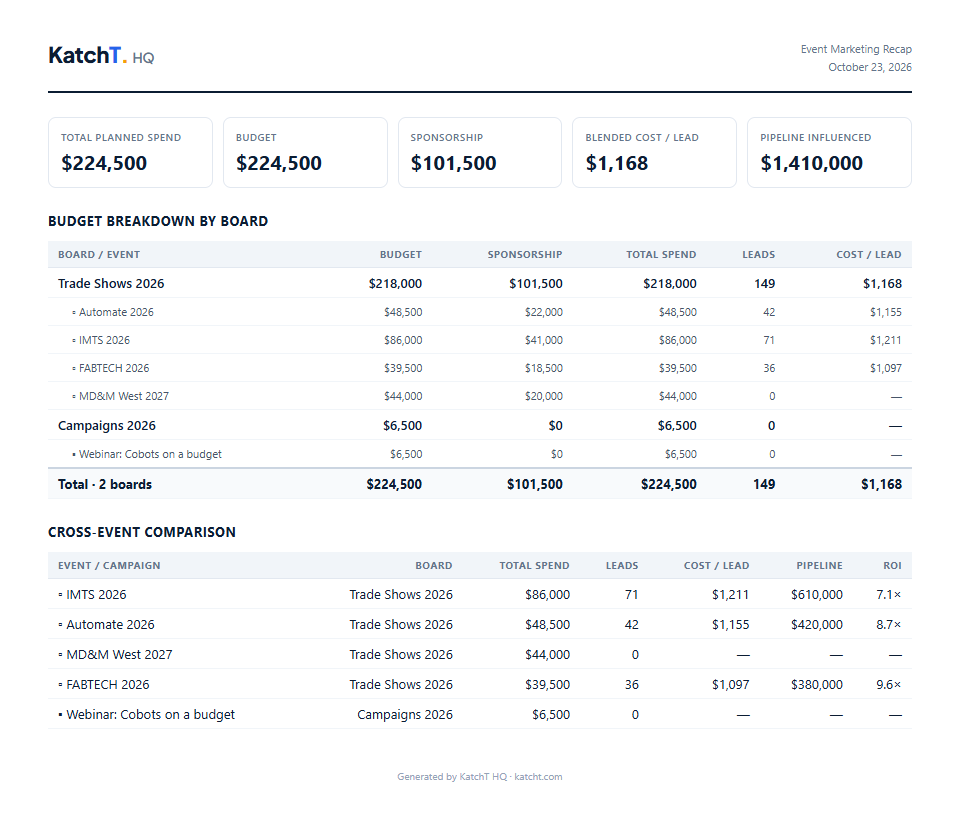
- A summary strip: total planned spend, budget, sponsorship and blended cost per lead. Pipeline appears too if you've entered it. Cost per lead is each show's budget (its total planned cost, sponsorship and vendors included) divided by its leads.
- Budget breakdown by board: every event under each board, with budget, sponsorship, total spend, leads and cost per lead.
- Cross-event comparison: every event side by side with spend, leads, cost per lead, pipeline and ROI. That table is your baseline.
To get ROI on the PDF, open an event, fill in Pipeline influenced (the deal dollars the event helped create), and print again. The keep, fix or cut call is still yours to write: add it in the email you send the PDF with.
The recap is on Pro and Business, and in every new workspace's 7-day Pro trial. Start free: build your recap in KatchT HQ.