Last updated
Asana vs Monday vs Smartsheet vs Microsoft Project for Trade Show Planning
By Joseph Lopez, founder of KatchT
Most event teams already pay for a project tool. Asana, monday.com, Smartsheet or Microsoft Planner and Project usually arrive with the company, and the trade show calendar gets built in whichever one IT approved. All four handle tasks, owners and due dates well. The gap shows up the Monday after the show, when your VP asks what the booth produced and the answer lives in three other files.
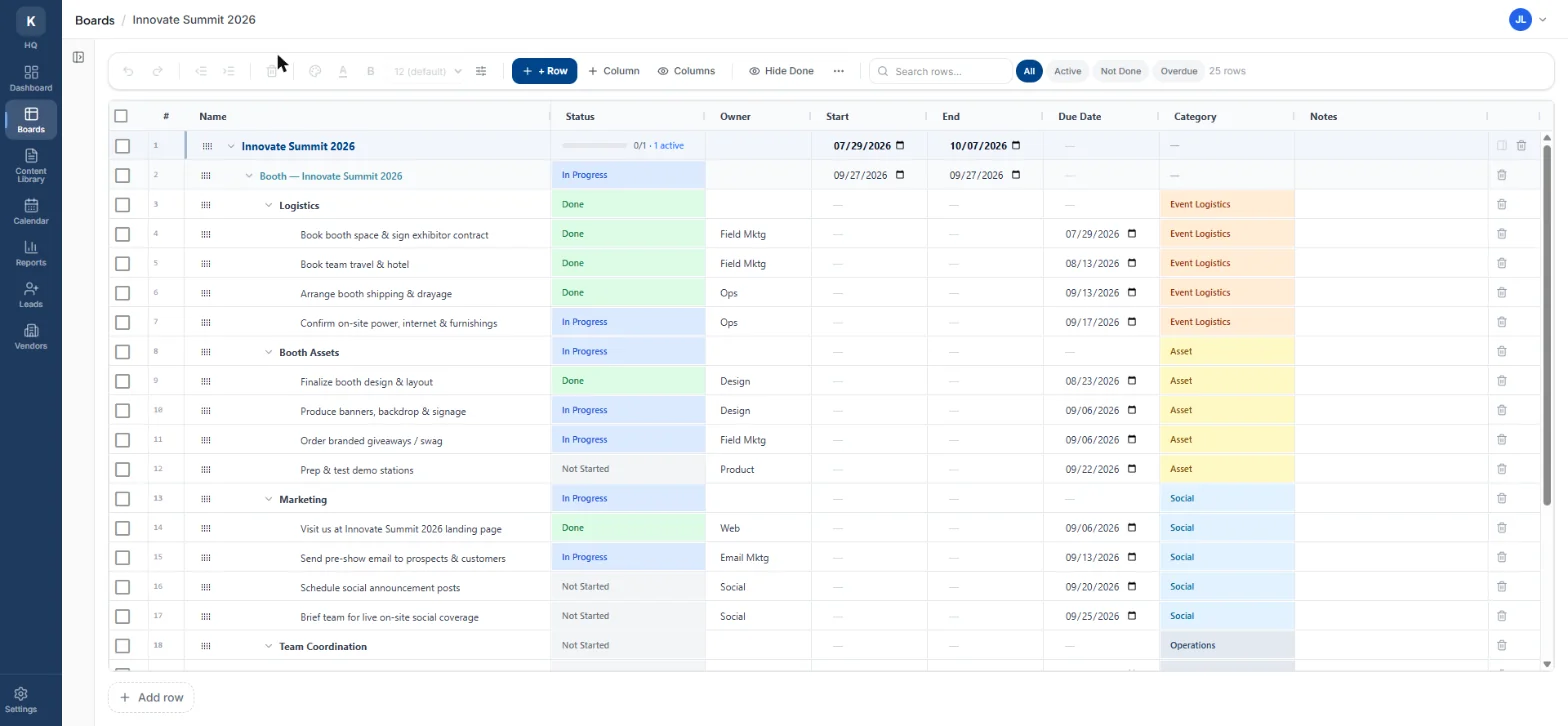
This guide compares the four on the jobs a trade show team does. KatchT HQ is our product, so it's in the first column, with its limits marked too.
The comparison
Prices are list prices from each vendor's pricing page, in US dollars per person per month, billed annually, checked November 25, 2026. Prices change, so confirm them before you buy.
| KatchT HQ | Asana | monday.com | Smartsheet | Microsoft Planner and Project | |
|---|---|---|---|---|---|
| Built for | Trade shows, field events, webinars and sponsorships | Tasks and projects across teams | Boards for any team's workflow | Spreadsheet-style project grids and rollups | Schedules, dependencies and resources inside Microsoft 365 |
| Paid plans from | Pro, $79 flat; Business, $149 flat for 3 people. Starter is free (1 board) | Starter, $10.99 per user | Basic, $9 per seat, 3-seat minimum | Pro, $9 per member | Planner Plan 1, $10 per user; Planner and Project Plan 3, $30 per user |
| Event templates | Trade Show board with tasks dated back from your show date | General event planning | General event planning | General event planning | Build your own |
| Scheduling depth | Gantt view on Pro. No task dependencies | Timeline and task dependencies on paid plans | Gantt and dependencies on paid plans | Gantt and dependencies on paid plans | The deepest: critical path, resource planning, baselines |
| Leads tied to an event | Built in. Add leads or import a CSV to an event | Build it with custom fields | Build it with custom columns | Build it with columns and forms | Not designed for it |
| Cost per lead by event | Built in. Budget ÷ leads, the same in every report (per event on Pro) | Build it yourself | Build it with formulas | Build it with formulas | Not designed for it |
| Trackable links and QR codes | Built in. QR codes that never expire, or tracked ones that count clicks and scans | Separate tool | Separate tool | Separate tool | Separate tool |
| Post-show recap | Event recap PDF and a cross-event table (Pro) | Dashboards you build | Dashboards you build | Dashboards and reports you build | Reports you build (Power BI for more) |
What a trade show team needs from any tool
Before comparing features, list the work. A single trade show runs on three clocks, and a tool has to handle all three.
Before the show (12 to 4 weeks out). Booth space and the exhibitor contract, travel and hotel, freight with its advance-warehouse deadline, booth graphics, giveaways, demo stations, the pre-show email to prospects. Almost every task here is dated backward from the opening day, and a missed freight cutoff costs real money. This is where project tools shine.
At the show (2 to 4 days). Booth staffing shifts, lead capture from badge scans and conversations, QR codes on signage and handouts, and notes on who asked about pricing. The work moves fast and happens on phones, and a project tool mostly holds the staffing checklist.
After the show (the first 2 weeks). Lead follow-up inside the first few days, the recap for leadership, final invoices and the cost per lead. This is where the budget gets defended, and it's the clock general tools cover least.
If your tool handles only the first clock, your team rebuilds the other two in spreadsheets after every show.
What each one does best
- Asana fits when the trade show is one project among many, and design, sales and product all work from the same task list.
- monday.com is the easiest to shape around your own process, with automations that move items between owners and statuses.
- Smartsheet suits teams that think in spreadsheets and need rollups across many projects for a PMO or finance.
- Microsoft Planner and Project is the right pick when the schedule is the hard part: long lead times, task dependencies, shared crews and a fixed opening day. Your company may already pay for it.
How to track cost per lead in each tool
Any of the four can track leads and cost per lead if you build it. Here is what that takes in each one.
- Asana: add number fields for the show's total cost and qualified leads to the event's project, collect leads with a form or a separate lead project, and do the division in a report or a spreadsheet. Someone updates the lead count by hand after every show.
- monday.com: add numbers columns for cost and leads, a formula column for cost per lead, and a dashboard widget to compare shows. Check which plan includes the formula column before you build.
- Smartsheet: the closest fit for this job. Collect leads with a form into their own sheet, count them per event with a formula, and divide by a cost column. Sheet summaries and dashboards roll the numbers up across shows.
- Microsoft Planner and Project: built for tasks and schedules, so most teams keep the lead list and the cost math in Excel next to the plan, and build the recap in Excel or Power BI.
In all four, the setup is yours to build and keep consistent: the same cost lines and the same lead definition for every show, or the comparison breaks.
Where trade show teams get stuck
Three things sit outside the project tool in most teams:
- Leads. Badge scans and booth conversations land in a spreadsheet or the CRM, away from the event's budget.
- QR codes. Booth signage QR codes come from a separate generator, so scans never reach the event's numbers.
- The math. Cost per lead gets rebuilt by hand for every recap, often with different cost lines each time. How to compare results across events covers the columns to hold constant.
KatchT HQ was built for those three. Each event carries its budget, vendors, tasks, leads and links, so cost per lead and QR scans sit on the event as soon as the leads are in. To estimate a show's cost per lead before you commit, try the free Event ROI Calculator.
Five questions to ask before you choose
- How many people need to edit? Per-seat pricing grows with the team; a flat price doesn't. Count the people who update the plan, not everyone who reads the recap.
- Where do leads land today? If badge scans go straight into the CRM and you never need them by event, a project tool plus the CRM may be enough.
- Who builds the cost-per-lead math, and who keeps it current? If the answer is "whoever has time after the show," expect gaps in the comparison by next year.
- Do you print QR codes? If yes, decide where scans get counted and whether you can change where a printed code points.
- What does IT already pay for? A tool your company already licenses wins most ties. Use a second tool only for the jobs the first one leaves to spreadsheets.
Use both, or pick one
If you only need tasks and dates, a general tool costs less. Three people on monday.com Basic pay about $27 a month; KatchT HQ Business is $149. KatchT is worth paying for when you need leads, scans and cost per lead for each event without building them yourself.
Many teams keep the company's project tool for cross-team work and run their trade shows in KatchT HQ. If you run a few shows a year on your own, the free Starter plan gives you one event board with a blended cost per lead.
Do it now
In a spreadsheet: list your last three shows, one row each, with total cost, qualified leads and cost per lead. Next to each number, write which file or tool it came from.
In KatchT HQ: create a board from the Trade Show template, enter the show's budget on the event row and import its leads from a CSV. Reports shows the event's cost per lead. Every new workspace gets Pro free for 7 days, no credit card. Start free: build your first event board in KatchT HQ.
Asana, monday.com, Smartsheet, Microsoft Planner and Microsoft Project are trademarks of their owners. KatchT is not affiliated with them. Sources: Asana pricing, monday.com pricing, Smartsheet pricing, Microsoft Planner pricing.
Joseph Lopez is the founder of KatchT and plans and runs B2B trade show and event programs. KatchT HQ is built around the questions those programs raise: what a show cost, what it produced, and whether to book it again.